
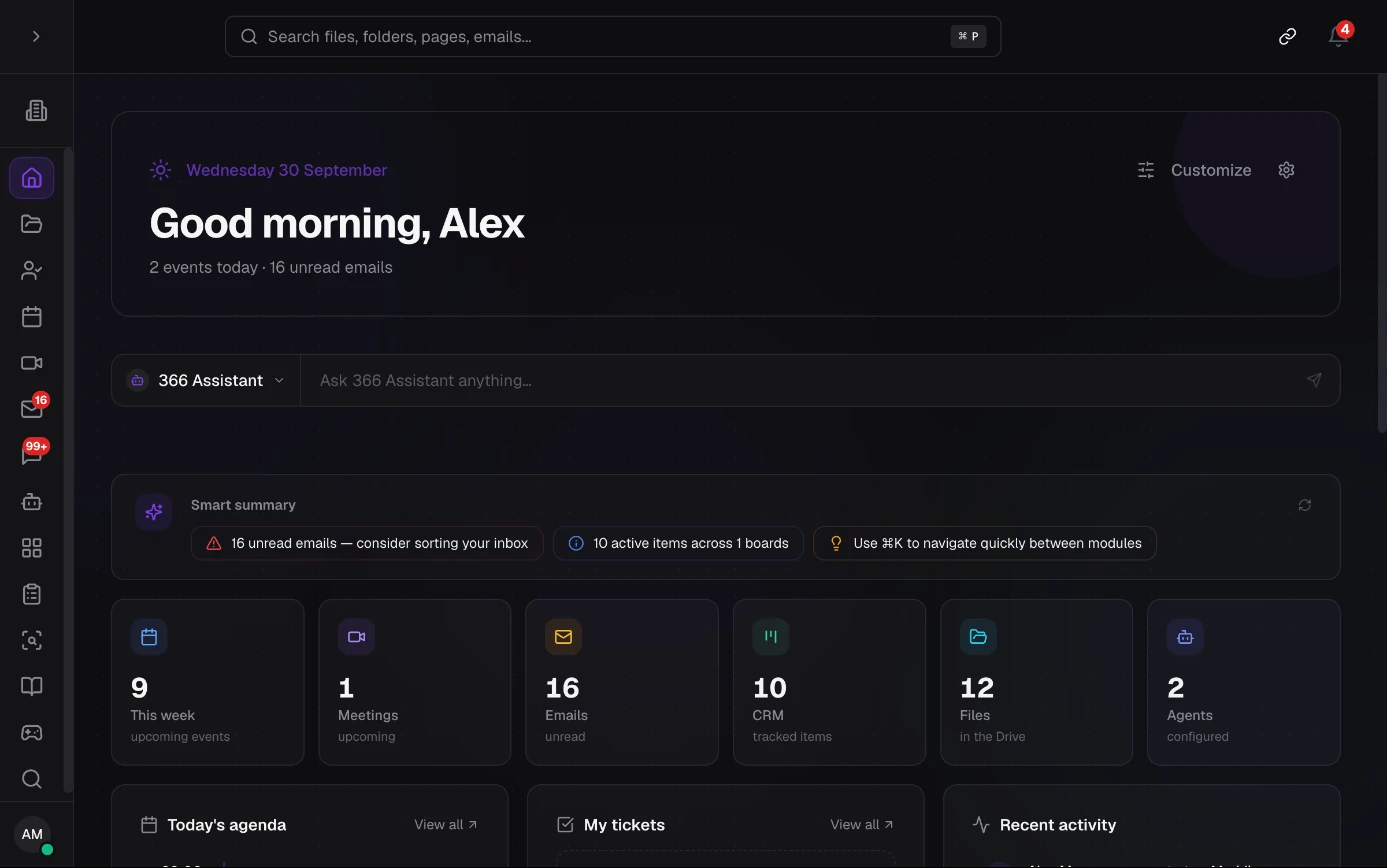
One suite. All your tools.
Mail, calendar, video calls, chat, files, tracking boards: Suite 366 replaces fragmented tools. Your teams and your PersonIA work in it side by side.
- Collaboration
- CRM & projects
- Shared documents
The Suite 366 modules
Build your workspace, module by module.
Drive
All your files. All their context.
Chat
Conversations that move work forward.
Mail
Email belongs with your work.
Meetings
Meet. Decide. Keep the context.
Calendar
Make everyone’s time work together.
Agents
An assistant shaped around your work.
CRM
Your customers, your deals, your projects.
Pages
Keep team knowledge up to date.
IDP
From document to usable data.
Signatures
From PDF to signature, inside the Drive.
Forms
Good questions. Useful answers.
Dashboard
Your day, your way.
Workbench
Your coding workshop, inside the suite.
Virtual Office
A place for distributed teams.
PersonIANew
Your new AI colleagues.
PersonIA chase your quotes, answer your emails and prepare your meetings. They work inside your tools, on your premises, and wait for your approval before anything is sent.
 BobySales
 RobinResident relations
 AlexOrganization
 MilaFinance
 NoaLegal assistant
1On the team
You hand it over. The work moves forward.
A PersonIA has a name, a role and its own access. It works where your team works.
It sees the job through, and comes back to you as soon as your approval is needed.
One @ is enough.
Mention it in the team conversation. It answers in front of everyone.
It takes the record.
Assign it a customer record or a quote. It becomes the owner.
It reads its email.
Write to it, or hand it the contact@ mailbox. It sorts what comes in.
It prepares the meeting.
Invite it. The agenda is ready before you walk in.
It also answers from
- Teams
- Slack
- Mattermost
- Telegram
2Its memory
It learns from every exchange. And from every file.
As conversations go by, a PersonIA remembers your team’s people, clients, deadlines and habits.
- The files shared with it join the same map: it reads them and ties their content to what it already knows.
- When a piece of information changes, its memory is corrected.
Click an exchange to see its memory at that point.
What it learns about a person stays attached to that person. It only reads the files shared with it.
3Day to day
What you expect from a colleague.
It takes the initiative, asks before acting and keeps to what you hand it.
It gets started on its own.
An email comes in, a record is assigned to it, a meeting is coming up: it gets going on its own.
It asks before it sends.
Sensitive actions wait for your approval. You see the details, then you approve or reject.
It sees what is shared.
It has its own access. Your mailbox and your private files stay invisible to it unless you share them.
One button, and it stops.
You stop it with one click. Every action stays recorded in its log.
4For your trade
Every trade has its PersonIA.
Small business
Boby · Sales
Boby follows up while you are with a customer.
- Answers customer requests
- Chases pending quotes
- Prepares your appointments
- Posts the morning brief
Law firm
Noa · Legal assistant
Noa knows the file before the hearing.
- Summarizes the exhibits of a file
- Tracks deadlines and hearings
- Prepares letters from your templates
- Finds the clause, with its source
A lawyer approves every document.
Local authority
Robin · Resident relations
Robin prepares the replies. Your staff decide.
- Sorts the residents’ requests
- Prepares replies for review
- Writes meeting minutes
- Flags overdue files
Support, HR, accounting, projects: together we design the PersonIA your teams need.
Request a demoWhat you can do
Everyday tools
Drive, documents, calendars, email, conversations and boards: find your team’s tools in one place.
Humans + PersonIA
Chat with colleagues, assign tasks to a PersonIA and move projects forward together.
Your organization, your rules
Organize files, projects and access around your team’s needs.
Get started on video.
Tutorials from the Suite 366 team, narrated in French.
Runs on your premises.
Where this application runs, and the technologies that come with it.
- On-premises
- On your servers, with a configuration sized for you.
- DIWY
- Available on DIWY, depending on your configuration. Discover DIWY
- Requirements
- Suite 366 runs on Devana OS, on DIWY or compatible infrastructure. Models, storage and access are sized for your needs.
Explore further
Technologies that work together.